
Question-led guide · diagnostic
How do I debug an AI-built page when I do not understand the code yet?
A beginner debugging sequence using exact reproduction steps, expected and observed results, page and console evidence, one hypothesis, and a small correction.
Direct answer
Start with a repeatable action and write what you expected and what actually happened. Check the current page, the relevant input, and any browser error before asking AI to change code. Ask for one explanation and a small correction, then repeat the same check. Keep a working copy so that unsuccessful changes do not erase the evidence you started with.
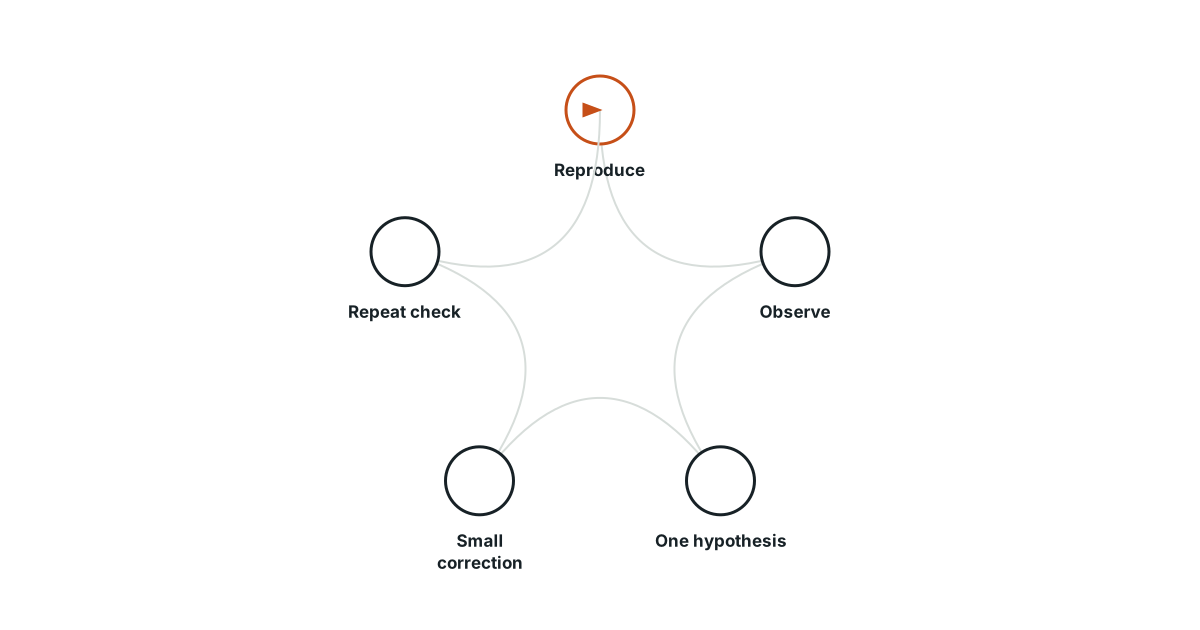
Turn “broken” into a sequence
Suppose selecting “Edit” on the second collection card opens the first card’s note. Write the smallest sequence that reproduces it: create two distinct entries, select Edit on the second, and observe the note in the form. Record which note you expected. These facts are useful even if you cannot yet name the function responsible.
Preserve a stable starting point
Save the current version or keep a recoverable copy before accepting a large repair. Retain the practice entries that trigger the problem. If several unrelated edits happen at once, a later success may be hard to explain and another feature may break quietly. A stable starting point helps you distinguish a correction from a coincidence.
Inspect the surface where the failure occurs
Check the visible label, selected entry, form value, and any browser console error relevant to the action. Browser tools can expose the page structure and execution messages. Do not paste a complete account log or secret value just because the assistant asks for more context. Share the smallest relevant error and invented reproduction data that explain the behavior.
Ask for an explanation with a predicted result
A useful request is: “The second card opens the first note. Here are the exact steps and the two practice titles. Explain which identifier or selection rule may be wrong, suggest one small correction, and state what should happen when I repeat the steps.” The explanation is a hypothesis. You still need the browser result after the change.
| Observation | Next bounded question |
|---|---|
| Wrong card opens | Which identifier reaches the edit action? |
| Click has no visible effect | Is the control connected to the intended handler? |
| Change vanishes after reload | Was data persisted or only redrawn? |
| Service request fails | What response or error reached the page? |
| Local page works, shared page fails | Which environment or address differs? |
Change one cause and replay the evidence
After the correction, repeat the original steps with the same data. Then check the neighboring behavior: edit the first entry, save a changed note, and return to the list. Keep this check proportional to the change. The aim is to establish that the observed defect was corrected without turning a small debugging session into an unrelated rewrite.
Record what you can now explain
Write a sentence connecting the cause, change, and result: for example, the edit action used position rather than the intended entry identifier. If the result improved but the cause remains uncertain, say so and preserve the reproduction. Understanding can grow through a series of small verified explanations. You do not have to understand the entire application to investigate one observable mistake responsibly.
Evidence and scope
- MDN Browser developer tools: Browser developer tools expose page structure, console output, and debugging facilities.
- MDN Client-server overview: Client-server applications exchange requests and responses, with server-side code processing requests.
The proposed checks are teaching tools; validate their behavior in the actual environment.
Evidence
Browser developer tools expose page structure, console output, and debugging facilities.
Browser developer tools expose page structure, console output, and debugging facilities.
Primary source · official-doc · checked Sep 11, 2026
Limit: This source supports the named mechanism, not the outcome or thresholds of the illustrative workflow.
Client-server applications exchange requests and responses, with server-side code processing requests.
Client-server applications exchange requests and responses, with server-side code processing requests.
Primary source · official-doc · checked Sep 11, 2026
Limit: This source supports the named mechanism, not the outcome or thresholds of the illustrative workflow.
Limitations
The scenarios and decision worksheets are original teaching examples. They are not measured deployments or guarantees; adapt the checks to the actual system and its documented behavior.
FAQ
- Should I paste the entire project and all logs into the assistant?
- Start with the relevant behavior, exact reproduction, and minimal safe evidence. Expand only when a specific missing detail matters.
- What if the assistant sounds certain about the cause?
- Treat the explanation as a hypothesis and repeat the failing action after the proposed correction.
Related guides
Continue within Build your first app with AI, or use one of these adjacent diagnostics:
Editorial QA: automated native-English, structure, source-presence, and link checks completed . This record is not an independent expert endorsement. Review boundary.